Search and browse help
How to add a chatbot to ChatGPT / Lovable
Install and test ChatbotGen on your ChatGPT / Lovable website.
Add ChatbotGen to the website your AI builder produces. The widget runs on your published website, not inside the ChatGPT conversation.
Add the script
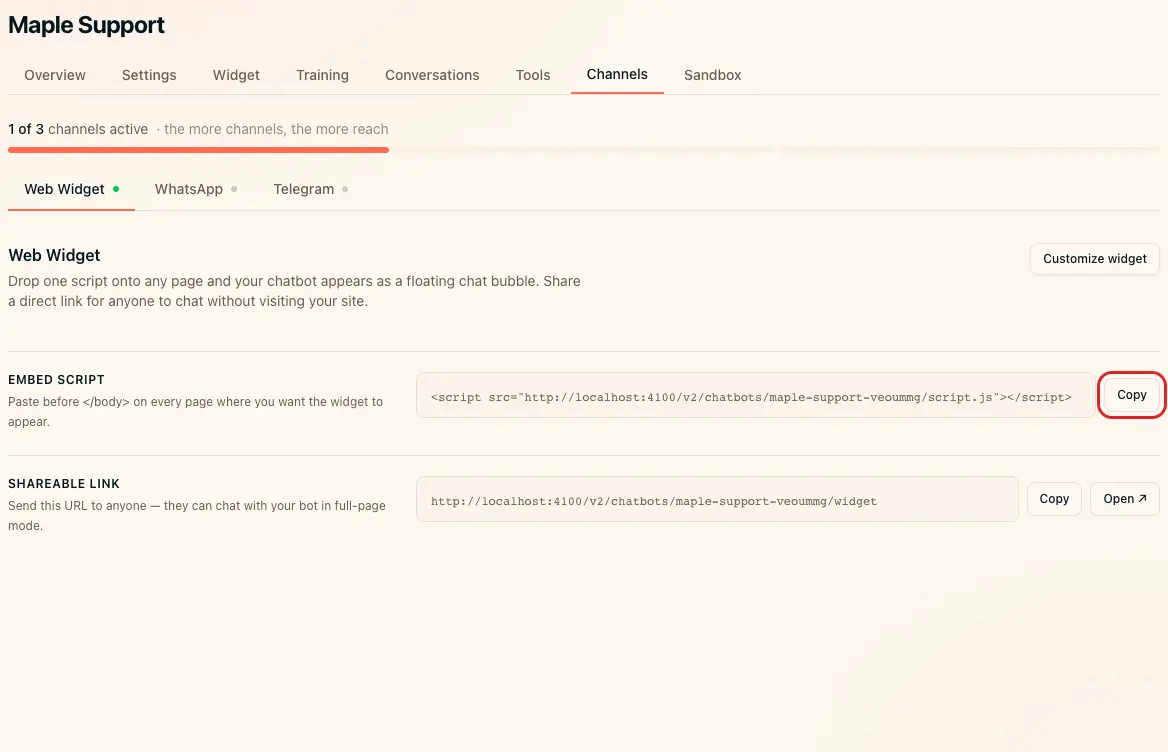
- Open Channels → Web Widget in ChatbotGen.
- Click Copy beside Embed script.
- Open the project in your site builder. If you started with the Lovable app in ChatGPT, continue editing in Lovable.
- Paste this request with your copied script:
Add this ChatbotGen embed script once to the shared website layout, before the closing body tag. Keep the script URL unchanged. Do not add it to every React component. Ensure it does not create duplicate chat bubbles when navigating between pages.
- Review the generated change in the preview.
- In Lovable, click Publish and confirm Publish in the dialog. For later updates, use Publish changes.
For HTML generated in ChatGPT and hosted elsewhere, follow the HTML installation guide.
Verify installation
Open the published URL in a private window. Send a question through the bubble. Navigate to another page and verify that there is only one bubble. If the script appears as visible text, ask the builder to install it as a script in the site layout.